Speech-to-Text Helps When Brain Fog Strikes
What Brain Fog Actually Feels Like
When I get a fibromyalgia flare-up — or even just a day or two of heavy brain fog — some of the things I normally enjoy suddenly become incredibly difficult.
Writing or journaling can feel almost impossible. I find myself searching for words, forgetting what I was about to say halfway through a sentence, or completely losing my train of thought. Simple conversations become frustrating because communication suddenly takes far more effort than it should.
Typing can also become exhausting. Pain, fatigue, poor concentration, wrist stiffness, and hand pain all combine to turn something simple into a draining task.
If you live with fibromyalgia, chronic fatigue, or another long-term condition, you may know exactly what I mean. Brain fog is not “just being forgetful.” It can feel like your mind is moving through thick mud while the world around you keeps moving at full speed.
Why Speech-to-Text Can Help
One thing that has genuinely helped me during flares is speech-to-text technology.
Using dictation reduces the physical effort needed to type, but it also helps thoughts flow more naturally. Sometimes speaking feels easier than trying to force words through tired hands and an exhausted brain.
It can also help capture thoughts before they disappear — something many people with fibro brain fog know all too well.
During difficult days, speech-to-text removes at least one barrier. And honestly, that can make a huge difference.
Instead of fighting through the frustration of typing, I can focus on simply getting my thoughts out.
The Tools Themselves
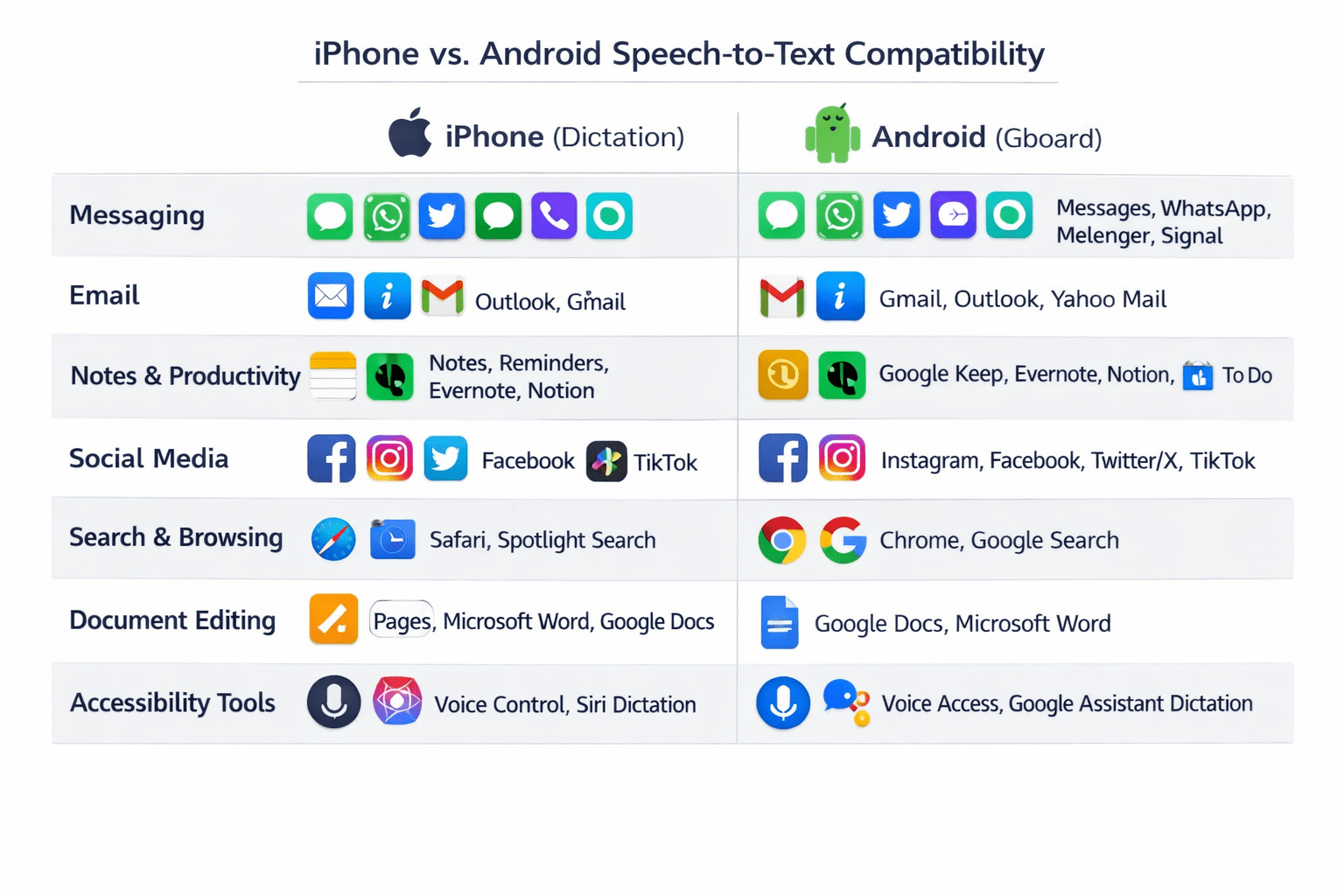
The easiest way to get started with speech-to-text (also known as dictation) is by using the tools already built into your smartphone.
The two most common options are:
- Apple Dictation on iPhone
- Gboard Voice Typing on Android
The best part? They’re free, simple to use, and already available on most devices.
🎤 Speech-to-Text on iPhone (Dictation)
- Open any app with a keyboard
Messages, Notes, Mail, WhatsApp, and more. - Tap the microphone icon
It’s usually located next to the space bar. - Start speaking
Your words will appear as text almost instantly. - Tap “Done”
This stops dictation and returns you to the keyboard.

🎤 Speech-to-Text on Android (Gboard)
- Open any app with a keyboard
Gmail, Notes, Messages, WhatsApp, and more. - Tap the microphone icon
Usually found at the top-right of the keyboard. - Speak clearly
Your speech will be converted into text in real time. - Tap the microphone again
This stops voice typing.

Speech-to-text works in most apps that use your phone’s keyboard, making it a useful tool for emails, messages, journaling, blogging, and even note-taking.
 Helpful Dictation Tips
There are also several voice commands you can use to make dictation smoother and more natural.
For example, you can say:
- “Period”
- “Comma”
- “New line”
- “New paragraph”
You can even chain commands together by saying things like:
“Period new line”
This ends the sentence and starts a fresh line instantly.
Small shortcuts like these can make dictation feel much less frustrating once you get used to it.
Microsoft Word Dictation
Microsoft Word also includes built-in dictation tools, and they can be brilliant for:
- Blog writing
- Journaling
- Longer-form content
- Drafting ideas quickly
One of the biggest advantages is that you can “brain dump” first and edit later, during clearer moments when your pain and fatigue are more manageable.
For people living with neurofatigue or fibro brain fog, that’s a powerful concept.
You do not have to create perfect writing in one sitting.
Google Docs Voice Typing
Another excellent option is Google Docs Voice Typing.
I particularly like it because it is:
- Free
- Browser-based
- Beginner-friendly
- Available across devices
If you already have a Google account, your documents automatically sync across your phone, tablet, and computer.
Sometimes just knowing your notes are safely saved can reduce a little bit of stress.
AI Tools and Brain Fog
AI tools are also becoming increasingly useful for people dealing with fatigue and cognitive overload.
AI will not remove brain fog — unfortunately nothing can fully do that — but it can reduce some of the mental workload.
AI tools can help you:
- Organise scattered thoughts
- Turn rough notes into readable drafts
- Summarise long documents
- Clean up dictated text
- Create outlines and structure
On bad days, even reducing mental effort by 10–20% can feel significant.
Tips for Using Speech-to-Text During Flares
Here are a few things that help me personally:
- Speak slowly
- Don’t worry about mistakes initially
- Capture thoughts before they disappear
- Edit later when your energy is better
- Use bullet-point “brain dumps”
- Use headphones with microphones for better accuracy
- Record ideas immediately when they appear
Perfection can come later. Getting the thought down is the important part.
Final Thoughts
I used to feel guilty for needing tools like these.
Part of me worried people would see me as lazy, unintelligent, or incapable because I struggled to remember words or lost my train of thought so often.
But over time, I realised something important:
These tools are not shortcuts. They are accessibility tools.
They help me continue writing, communicating, and expressing myself during periods when my body and mind are struggling.
And honestly, being able to keep creating during a flare-up can sometimes provide a much-needed distraction from pain itself.
Thousands of people use accessibility tools every single day — and there should be absolutely no shame in that.
Some days brain fog still wins. But tools like these can make difficult days slightly more manageable — and sometimes that’s enough.
I’d genuinely love to hear your experiences too.
- Do you use speech-to-text or dictation tools?
- Which apps or devices help you most?
- How does fibro brain fog affect your daily life?
You’re definitely not alone in it.